
Validate and protect each provider key.
Add an OpenAI, Anthropic or Gemini key. The Hub tests it, encrypts it and shows only the final four characters when you return.
A free OpenAI, Claude & Gemini API integration WordPress plugin: store encrypted provider keys, discover models and share prompts and usage data across compatible Opace plugins.
Watch the walkthrough Opace AI Hub: Free OpenAI, Claude & Gemini API Integration WordPress Plugin WordPress
  View larger ↗
 Full walkthrough · 4:44
Watch the full product demonstration, then open it on YouTube whenever you want chapters, captions or a larger player.
How it fits together
Opace AI Hub keeps provider infrastructure in one place. Compatible plugins ask the Hub for the connection, model and request shape they need.
Add an OpenAI, Anthropic or Gemini key. The Hub tests it, encrypts it and shows only the final four characters when you return.

Model lists come directly from the configured account. Provider-aware defaults update when a saved choice disappears, while valid choices are preserved.

Compatible plugins call the public PHP API. Requests, tokens, errors and estimated cost are recorded under the calling tool's name.
What it does
The Hub handles the shared work that should not be rebuilt inside every AI integration WordPress plugin.
Settings
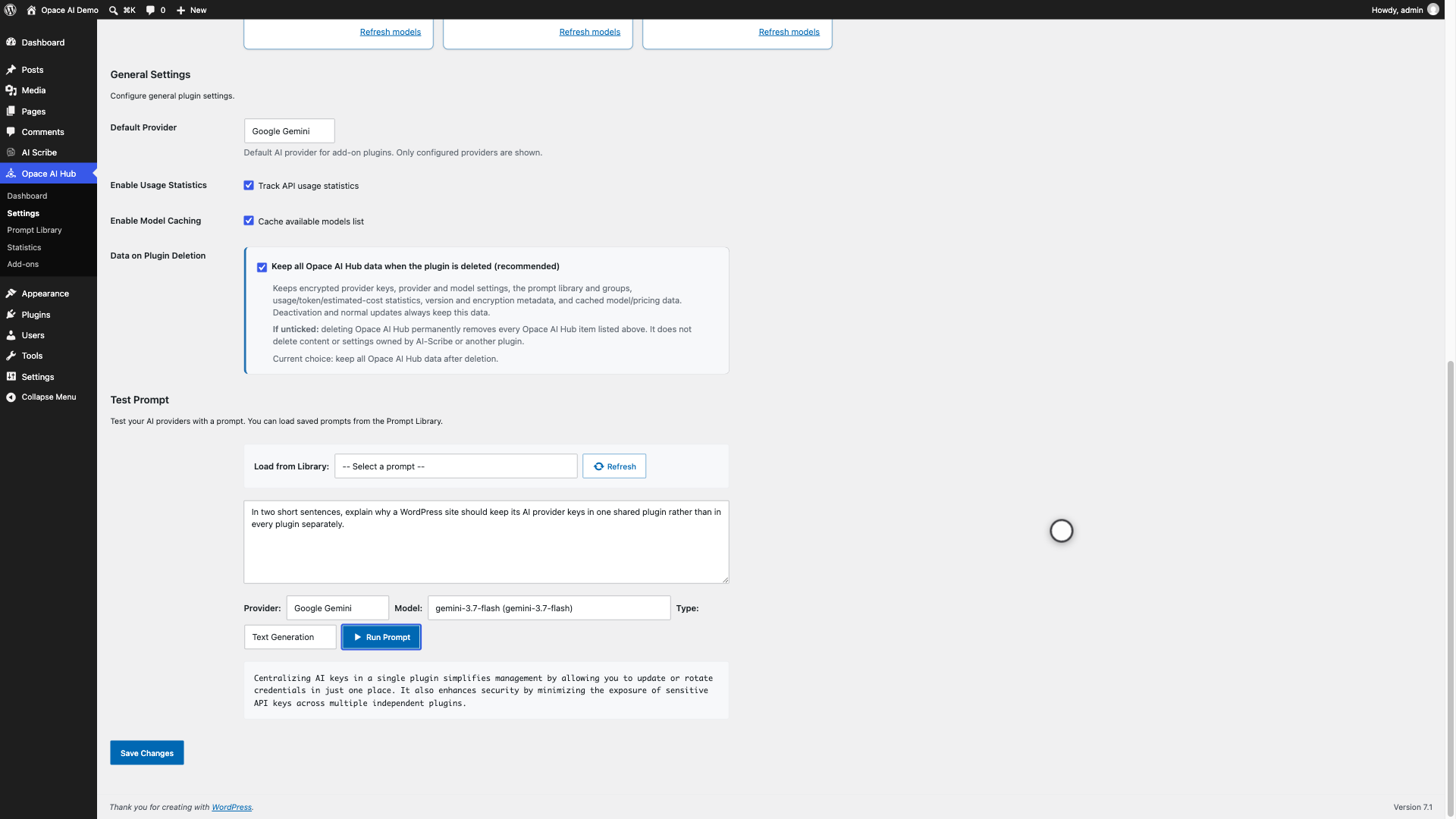
Connect OpenAI, Anthropic Claude and Google Gemini, test each key, refresh its models and select the default provider used by add-ons.
Each selected model receives only the controls it supports, including reasoning effort, thinking level, output tokens and temperature where the provider accepts them.
 View larger ↗
 Prompt Library
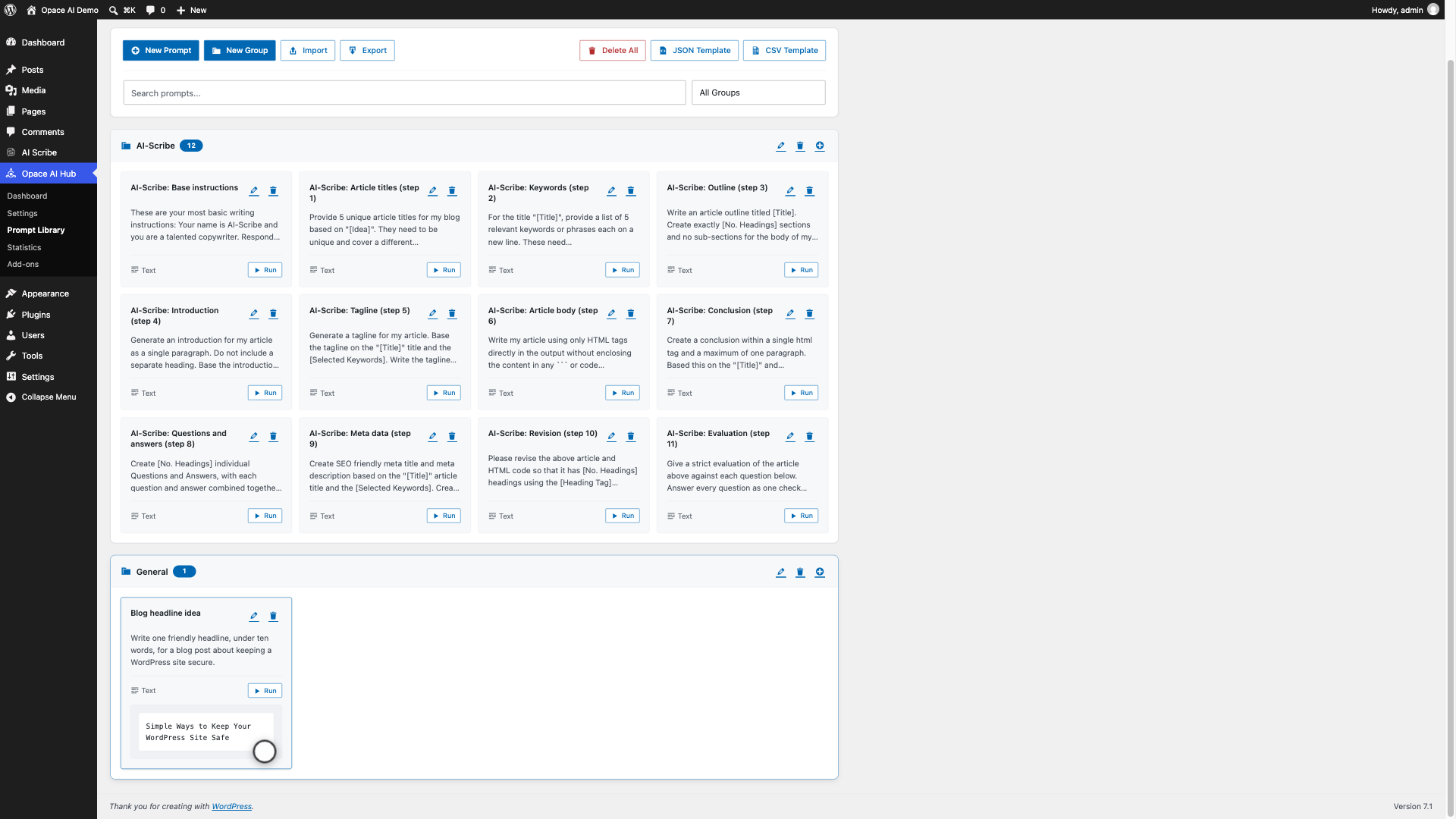
The Hub doubles as an AI prompt library WordPress plugin: group and search prompts, edit them in place and run text or image prompts directly from a library card.
View larger ↗ Statistics
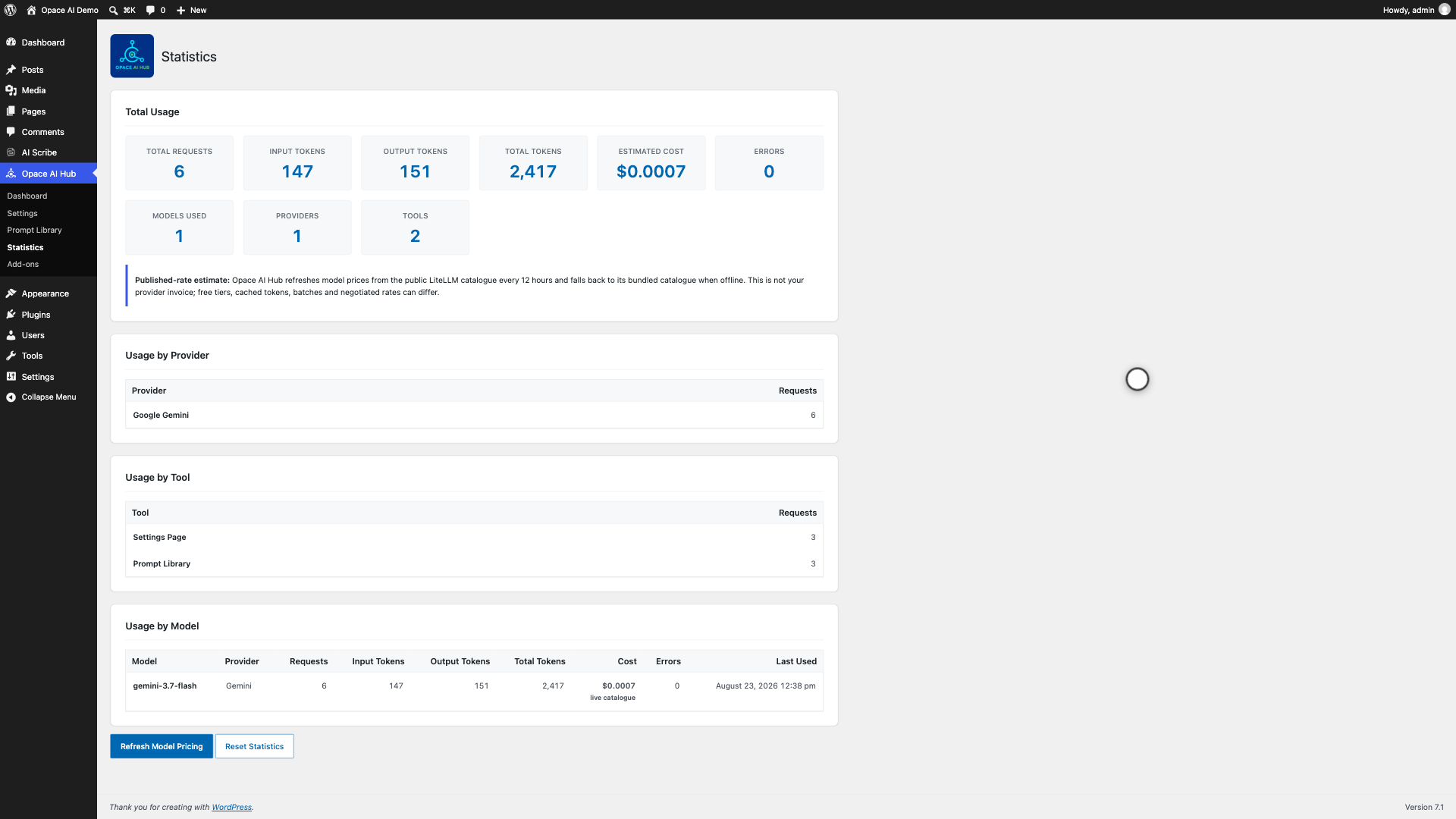
Review request counts, input and output tokens, errors and estimated cost. Pricing comes from published rates in the public LiteLLM catalogue and is refreshed every 12 hours.
 View larger ↗
 Dashboard and companion plugins
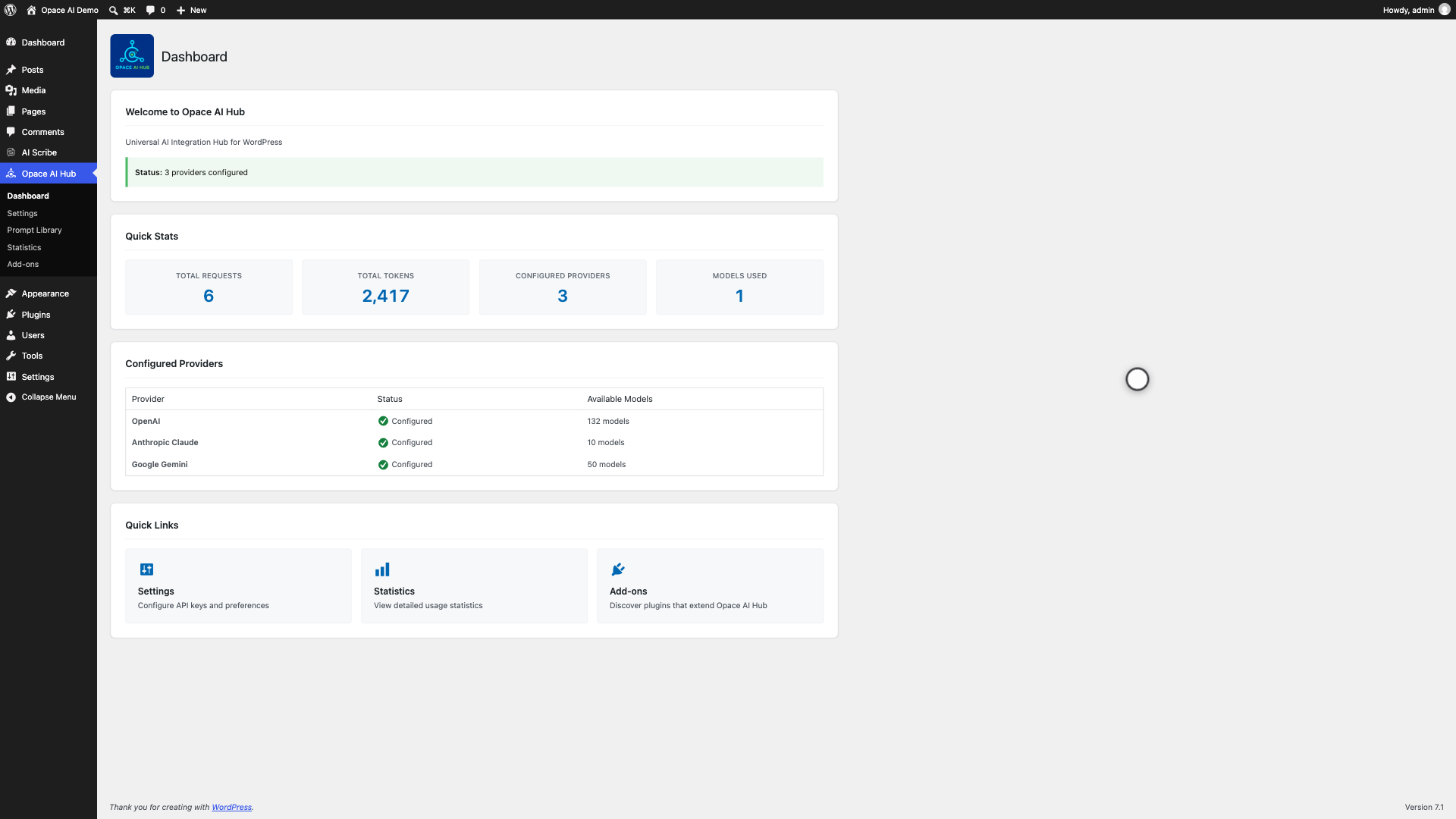
Provider status, model totals, quick statistics and direct links keep the active configuration clear. The Add-ons screen shows whether AI Scribe is installed and active.
WordPress 7 AI Client
On WordPress 7.0 or newer, an encrypted Hub key can authenticate the matching core AI provider for the current request. WordPress Connector credentials take precedence when both stores contain a key.
Keys are never copied between Opace AI Hub and WordPress Connectors. WordPress 6.5 to 6.9 continues to use the Hub's direct provider integration.
 View larger ↗
 Supported providers
Model choices are discovered from the configured account and filtered by capability.
| Provider | Text | Images | Structured output |
|---|---|---|---|
| OpenAI | Yes | Yes | JSON schema |
| Anthropic Claude | Yes | No | Forced tool calls |
| Google Gemini | Yes | Yes | Response schemas |
Encrypted keys · No Opace analytics
Opace AI Hub keeps credentials on your WordPress site and sends generation data only to the provider selected for that request.
Install
Start with Opace AI Hub so every compatible plugin has one shared source for providers, prompts and usage records.
Current public release: 1.0.17 on GitHub and WordPress.org. WordPress 6.5+ · PHP 7.4+ · Tested up to WordPress 7.1.
01  Plugins → Add New Plugin → Upload Plugin
02  Upload opace-ai-prompt-library-api-hub.zip
03  Activate Opace AI Hub
04  Opace AI Hub → Settings → add a key → Test Key
05  Choose a default provider and save
06  Install AI Scribe or another compatible plugin
Questions before installing
No. Obtain a key directly from OpenAI, Anthropic or Google. The provider charges your account for usage under its own pricing and terms.
No. It manages provider connections, models, prompts and usage data. Install a compatible plugin such as AI Scribe to generate content.
The core AI Client on WordPress 7.0 or newer can use multiple configured providers, discover suitable models and generate text or images. Opace AI Hub uses a Connector credential without copying it into Hub storage. If the key is stored in the Hub, the Hub supplies its decrypted value to the matching WordPress provider for that request only, so external plugins using the core client can use it too. The official OpenAI, Anthropic or Google provider plugin must be active. When both stores contain a key, WordPress Connectors takes precedence. WordPress 6.5 to 6.9 continues to use the Hub's direct provider integration.
Yes. You can save keys for multiple supported providers, so one install works as a Claude API WordPress plugin and a Gemini API WordPress plugin alongside OpenAI. A compatible plugin can use one provider for text and another for images.
Opace AI Hub asks each provider which models your key can access. Availability can differ by account, region and provider rollout.
No. Keys stored by Opace AI Hub are server-side, encrypted at rest, and are not printed into public pages or normal Hub responses. WordPress Connector credentials remain under WordPress core's storage rules and are not copied into the Hub. Other trusted server-side plugins can use the Hub or WordPress AI Client APIs.
Opace AI Hub keeps its data by default because other plugins may depend on it. To remove all Opace AI Hub-owned credentials, settings, prompt tables, statistics and caches, turn off Persist Settings on Uninstall before deleting the plugin. Opace AI Hub does not delete another plugin's data.
For developers
The example below uses the Hub as an OpenAI API WordPress plugin. The server-side ai_core() helper exposes provider defaults, request options, text and image generation, response extraction and usage records. Provider credentials must never be printed into HTML, JavaScript, logs or public API responses.
if ( ! function_exists( 'ai_core' ) ) {
    return;
}

$provider = 'openai';
$model    = ai_core()->get_default_model_for_provider( $provider );

if ( ! $model ) {
    return;
}

$response = ai_core()->send_text_request(
    $model,
    array(
        array(
            'role'    => 'user',
            'content' => 'Write a concise headline about tea.',
        ),
    ),
    ai_core()->get_provider_options( $provider, $model ),
    array( 'tool' => 'my-plugin' )
);

if ( is_wp_error( $response ) ) {
    $message = $response->get_error_message();
} else {
    $text = AICore\AICore::extractContent( $response );
}
Created by Opace Digital Agency
Opace builds and supports practical WordPress and AI systems for organisations in Birmingham, across the UK and internationally.
OpenAI, Anthropic and Gemini in WordPress
Opace AI Hub is independently developed by Opace Digital Agency and is not affiliated with, endorsed by or sponsored by OpenAI, Anthropic or Google. Licensed under GPL-2.0 or later.