
Turn an idea into a controlled structure.
Generate titles, review keyword roles and qualitative demand bands, check Google Trends and select the outline sections the article must cover.
A free AI SEO content creator WordPress plugin: plan, draft, humanise and publish WordPress content with OpenAI, Anthropic or Gemini through guided or Express workflows.
Watch the walkthrough AI Scribe: Free AI SEO Content Creator & Humanizer WordPress Plugin WordPress
 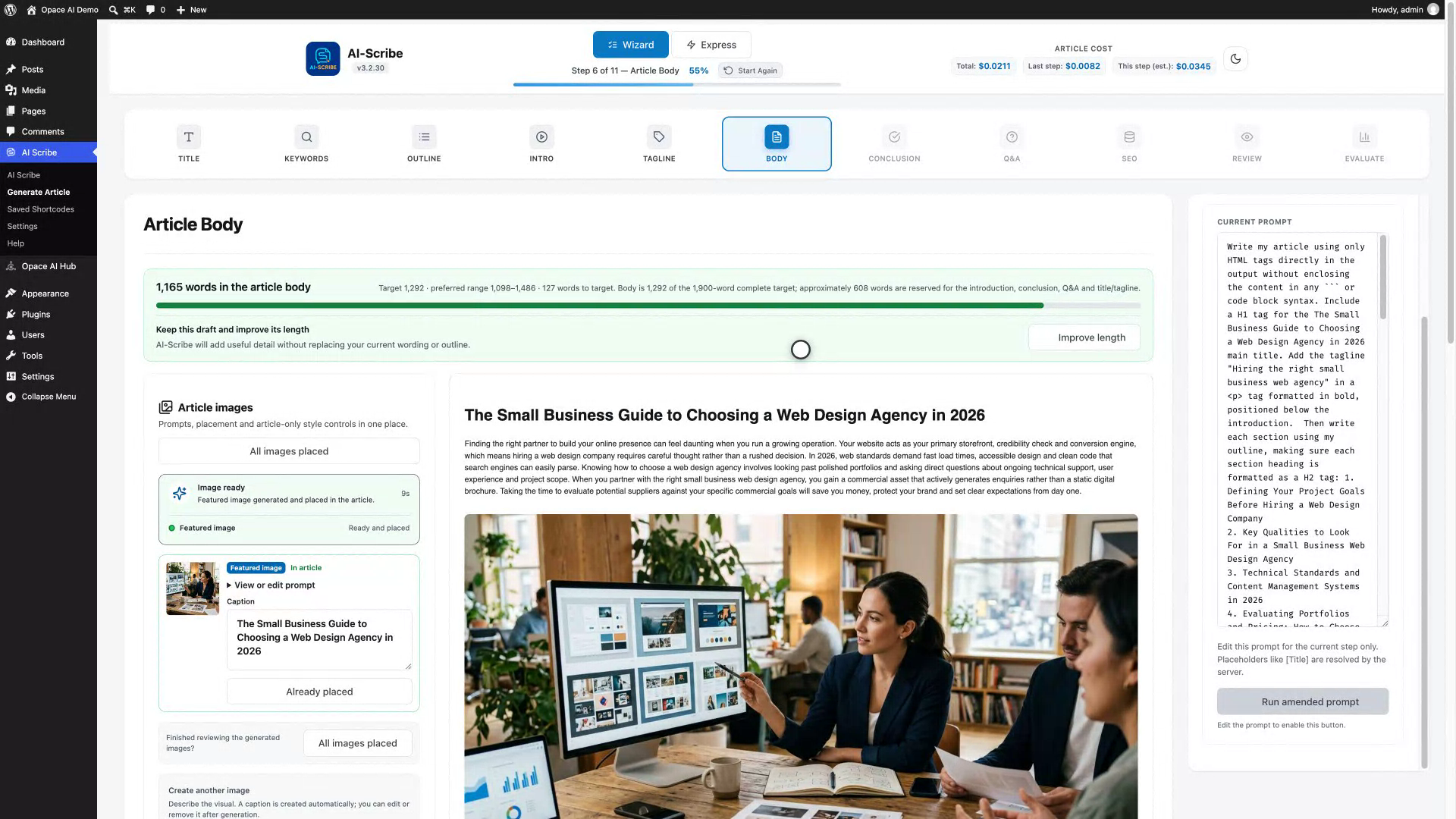 View larger ↗
 Full walkthrough · 8:51
Watch the full product demonstration, then open it on YouTube whenever you want chapters, captions or a larger player.
How an article is made
The guided route keeps one conversation thread across the whole article. Express mode produces a complete starting draft when one request suits the job better.
Generate titles, review keyword roles and qualitative demand bands, check Google Trends and select the outline sections the article must cover.

Write the introduction, tagline, body, conclusion and Q&A. Measured word counts show the target, preferred range and any shortfall before you improve length.

Edit SEO metadata, inspect save status and use Evaluate to separate structural facts from editorial checks. Save a draft, publish or create a shortcode.
The complete workflow
As an AI content writer WordPress plugin, AI Scribe combines planning, writing, images, SEO checks and WordPress output without hiding the prompt, provider or current save state.
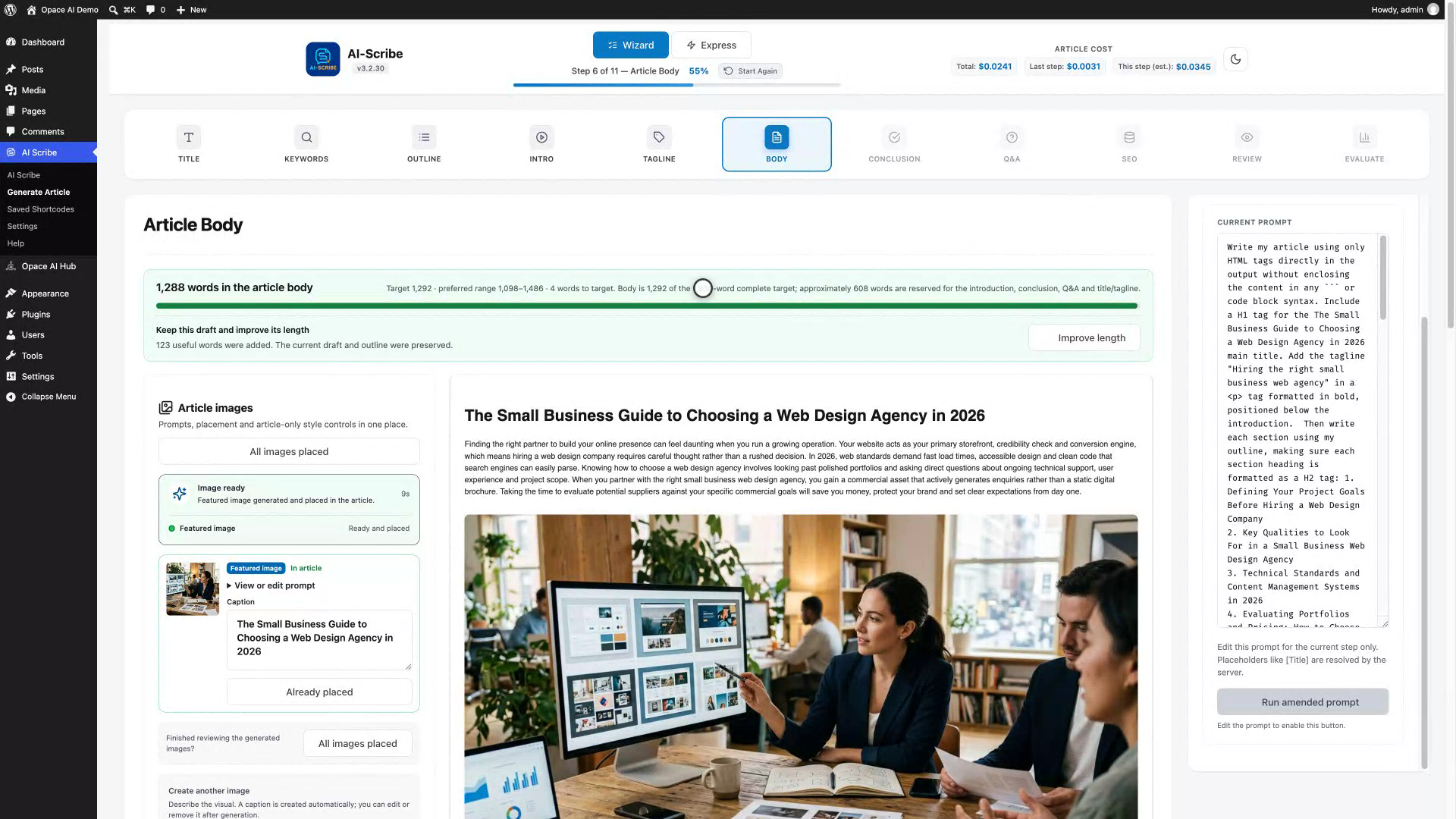
The eleven-step wizard
Title Generation, Keyword Research and Article Outline establish the direction. Introduction, Tagline, Article Body, Conclusion and Questions & Answers create the editable article inside one conversation.
SEO Meta measures title and description length and checks keyword coverage. Review & Edit shows the complete article, featured image and publishing details. Evaluate measures the final Review HTML and labels editorial judgements for human confirmation.
 View larger ↗
 Options and Prompt
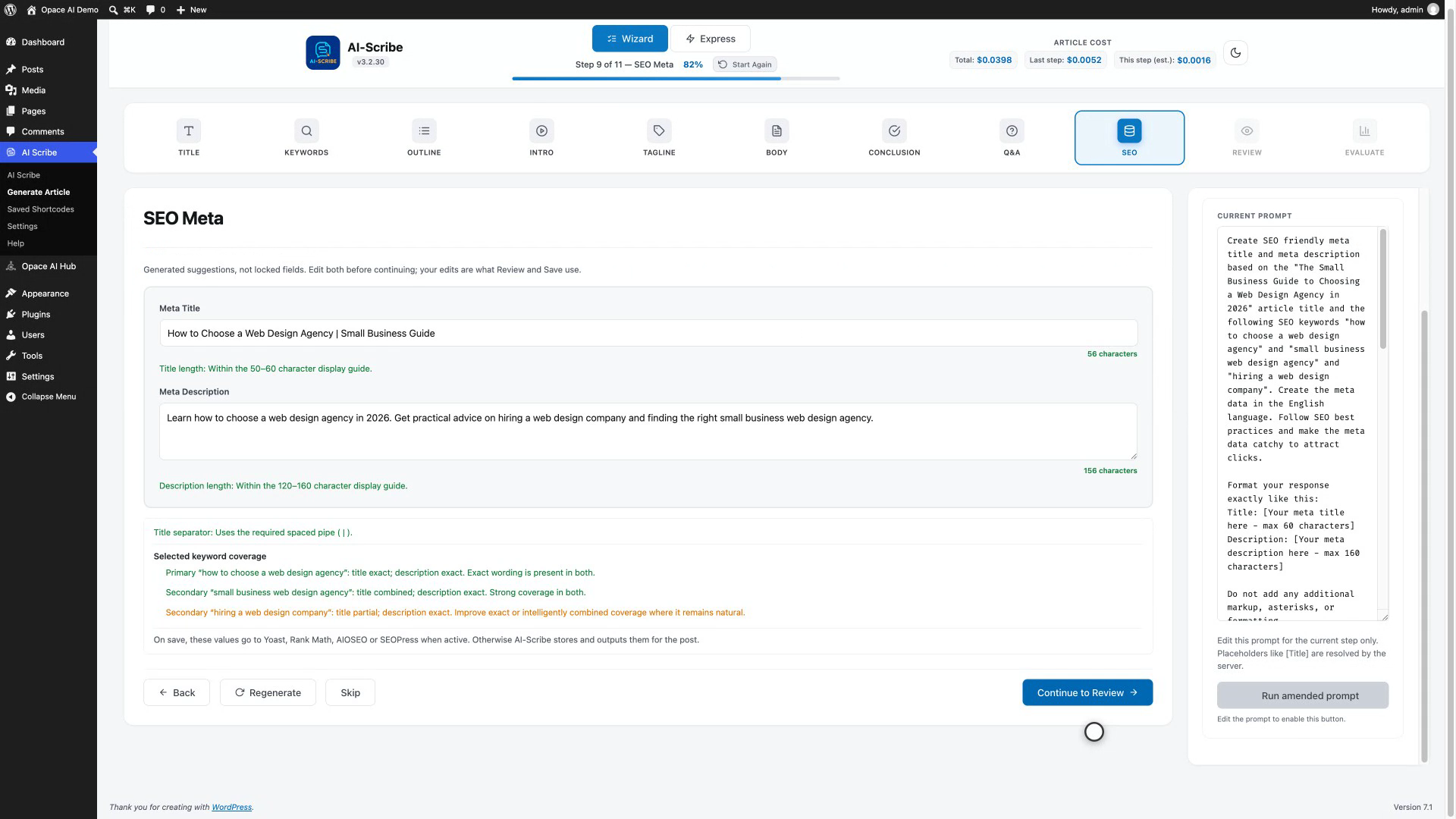
Each step shows its selected model, the assembled prompt and the estimated cost before generation. Results and prompts stay editable beside the current step.
 View larger ↗
 Express mode
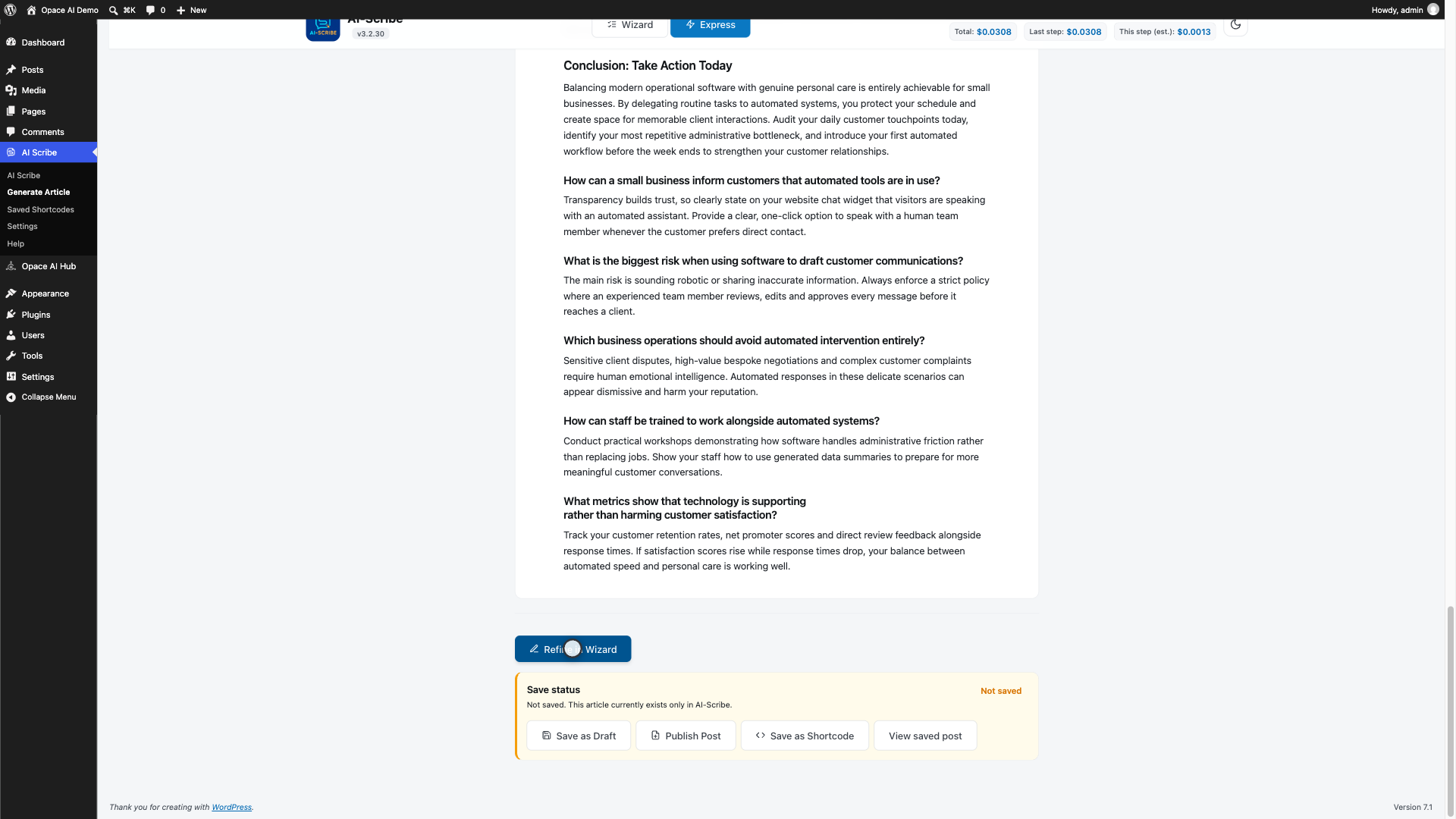
Enter a topic and optional article length. Express returns one structured article with an exact measured count, direct save actions and a route back into the wizard for refinement.
 View larger ↗
 Image Studio
The featured image is created visibly. Section-aware prompts can be edited before generation, and automatic captions can be amended or removed.
View larger ↗ Settings
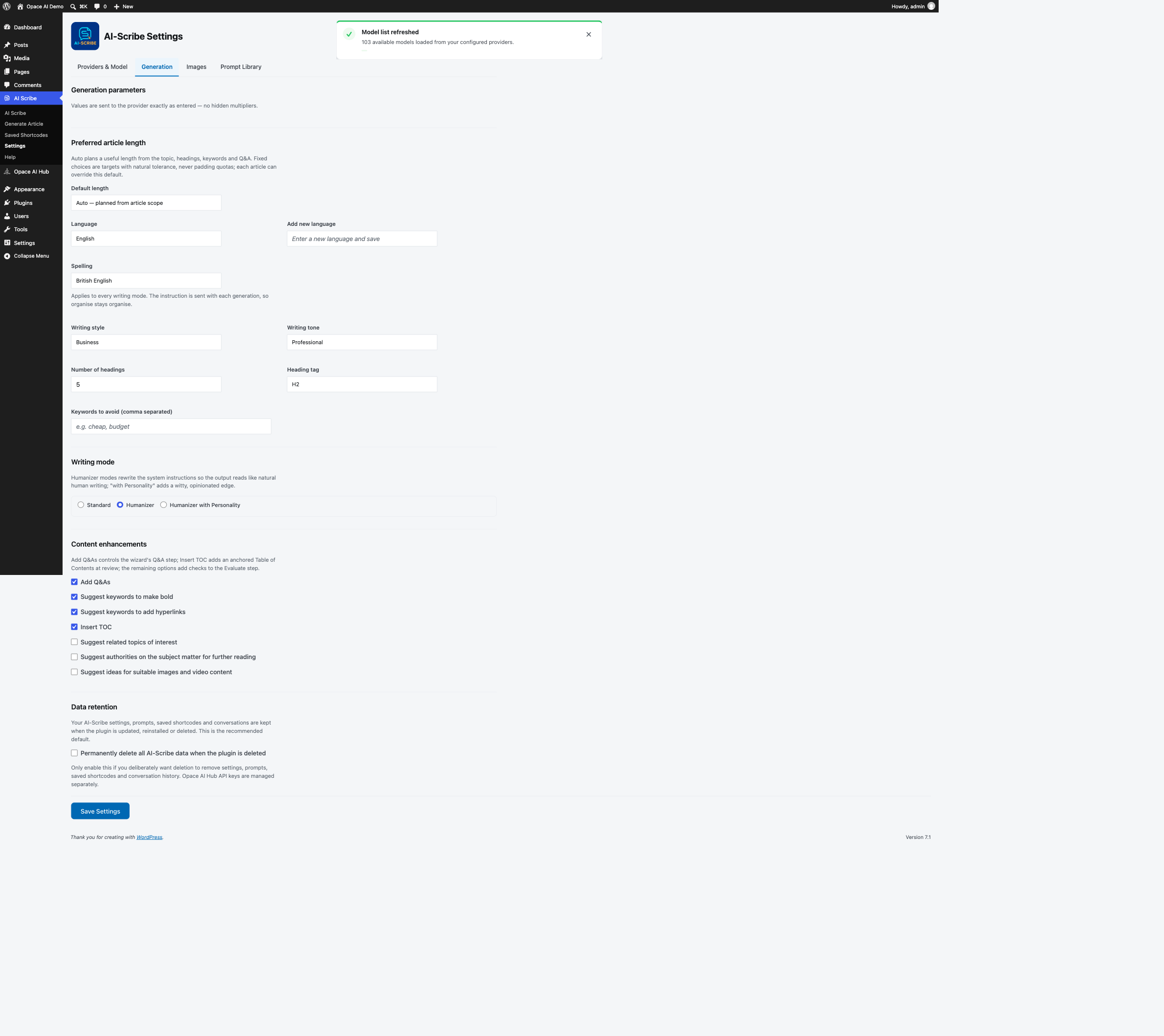
Providers & Model shows live status, the models exposed by the account and only the parameters supported by the selected model. Generation controls cover length, language, spelling, style, tone, structure and writing mode.
 View larger ↗
 Publishing and integrations
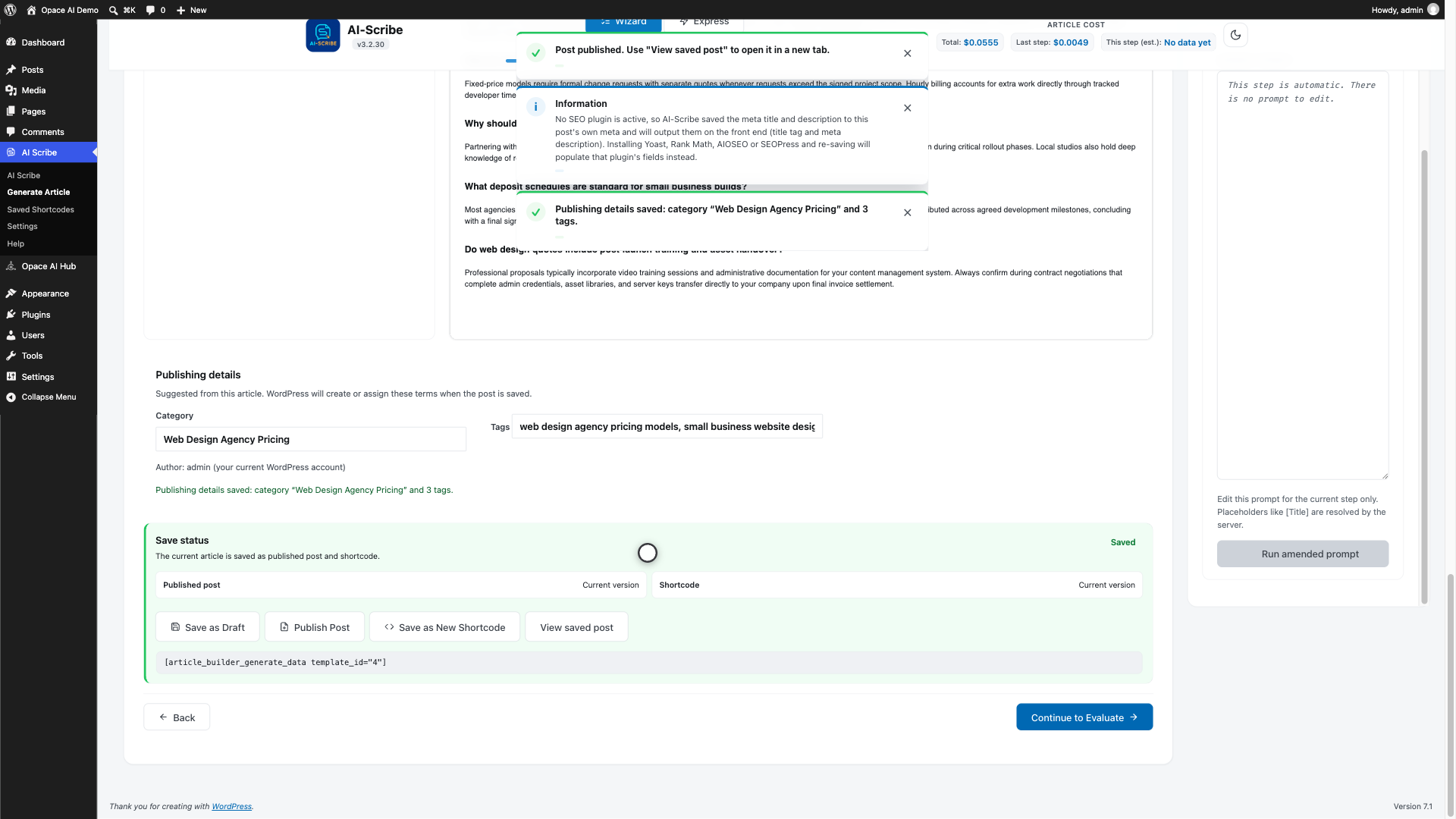
Save the article as a draft, publish it or create a reusable shortcode. Suggested categories and tags stay under editor control.
 View larger ↗
 Evaluate
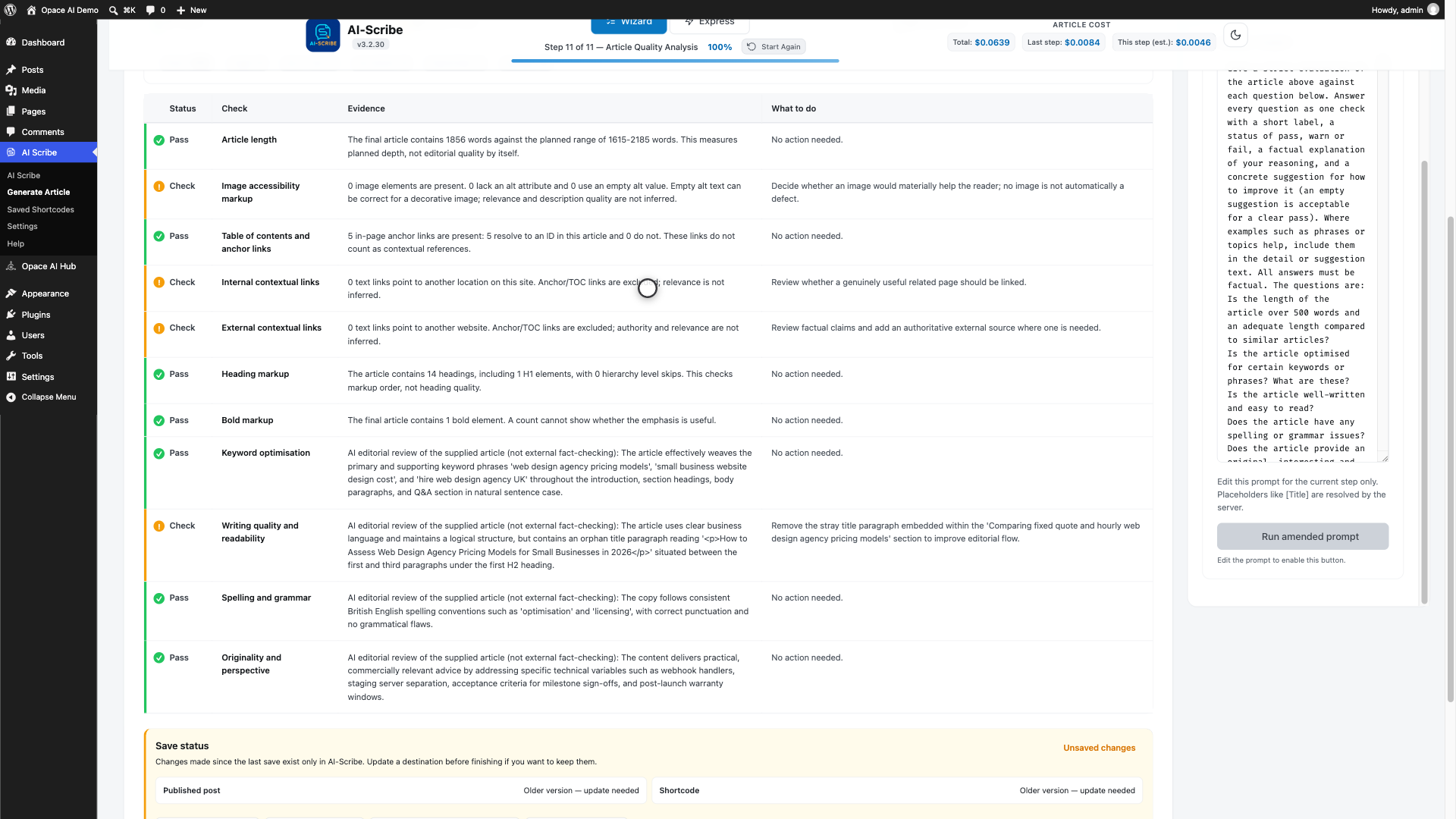
Evaluate reads the final Review HTML and reports images, alt markup, headings, table-of-contents anchors and links. Originality, authority and writing quality remain editorial checks for a person to confirm.
 View larger ↗
 Supported providers
Model choices are discovered from the configured account and filtered by capability.
| Provider | Text | Images | Structured output |
|---|---|---|---|
| OpenAI | Yes | Yes | JSON schema |
| Anthropic Claude | Yes | No | Forced tool calls |
| Google Gemini | Yes | Yes | Response schemas |
Measured word counts and explicit publishing
The interface distinguishes measured output from model estimates and makes every request or publishing action explicit.
Install
AI Scribe declares Opace AI Hub as a required separate plugin. WordPress refuses activation until the Hub is available, and AI Scribe shuts down cleanly if the Hub is later deactivated.
Current public release: 3.2.38 on GitHub and WordPress.org. WordPress 6.5+ · PHP 7.4+ · Tested up to WordPress 7.1.
01  Install and activate Opace AI Hub
02  Opace AI Hub → Settings → add at least one provider key
03  Install and activate AI Scribe
04  AI Scribe → Settings → Providers & Model
05  Check provider status and select a model
06  AI Scribe → Generate Article
Questions before installing
Yes. The Hub stores keys, discovers models, records usage and supplies shared prompts. With Anthropic alone, writing works but image controls are hidden. Add OpenAI or Gemini for images; any mixture of the three providers works.
Whichever compatible writing and still-image models your configured OpenAI, Anthropic or Google Gemini account grants you. Models are fetched live and filtered by capability, so Settings is authoritative when providers change account access.
You pay the provider's API rates. AI Scribe shows costs when trustworthy pricing exists and says Cost unavailable otherwise. Choose Auto, a preset or a custom word target. Visible counts, ranges and optional improvement requests never discard the usable draft after failure.
Yes. AI Scribe is a free AI SEO content creator WordPress plugin released under GPL-3.0 on GitHub and WordPress.org. You pay only your chosen provider's API rates.
No. Demand bands are marked as unverified AI estimates. Use the Google Trends links for relative interest and seasonality; they are not monthly-volume data.
It measures structural facts from the final Review HTML, including images, alt markup, headings, table-of-contents anchors and links. Originality, authority and writing quality remain editorial judgements requiring human confirmation.
No. Keys are managed by Opace AI Hub; requests go directly from your WordPress site to your chosen provider. AI Scribe only shows provider status and never renders keys into its page.
Use Settings → Generation. Choose Standard, Humanizer or Humanizer with Personality, the modes that make AI Scribe an AI humanizer WordPress plugin as well as a writer, and British or American English. Custom Instructions are applied last, so your brand rules win.
Yes. It integrates with Yoast SEO, Rank Math, AIOSEO and SEOPress. Standard post content works with WordPress editors, while saved shortcodes work in Divi, Elementor, widgets and ACF fields.
Keep the retained draft, check the provider-status chip, then retry. For repeated timeouts, use a faster model, reduce the requested length or ask your host about PHP or web-server time limits. Report persistent errors in the support forum with the step and provider, but never post an API key or private article content.
Only if you opt in through the delete-on-uninstall setting. Otherwise settings, conversations and saved shortcodes are retained.
Created by Opace Digital Agency
Opace builds and supports practical WordPress and AI systems for organisations in Birmingham, across the UK and internationally.
AI content writer WordPress plugin, from plan to publish
AI Scribe is independently developed by Opace Digital Agency and is not affiliated with, endorsed by or sponsored by OpenAI, Anthropic or Google. Licensed under GPL-3.0.