
Paste any URL or domain.
We normalise www, paths, ports and international characters before anything is judged.
Free SEO tool · Runs in your browser
Use this free Preferred Sources checker to test a domain's Google Preferred Sources format, then confirm the result in Google's own tool.
Use the checker
Checked entirely in your browser. Nothing you type is sent anywhere.
What this tool can and can't tell you. This checker validates the shape of your address (domain, subdomain or subdirectory), which is the eligibility rule Google publishes. True eligibility, meaning whether Google recognises your site as a source, can only be confirmed inside Google's own preferences tool. Google provides no public API for it, so any tool claiming to verify eligibility automatically is guessing.
news.google.com/swg/js/v1/publisher.js. The script tag should be in your <head>.google-add-preferred-source-btn (auto mode) or preferred-sources-control="manual" (custom button).Prefer it automated? Install the free Preferred Source Checker Chrome extension from the Chrome Web Store. It detects publisher.js and validates the button implementation on any page you visit.
The check runs entirely on this page. Nothing you type is transmitted, stored or logged, and the result links to Google's own preferences tool for confirmation.
Example results
These examples show the address-format check. Google's preferences page provides the final eligibility result.
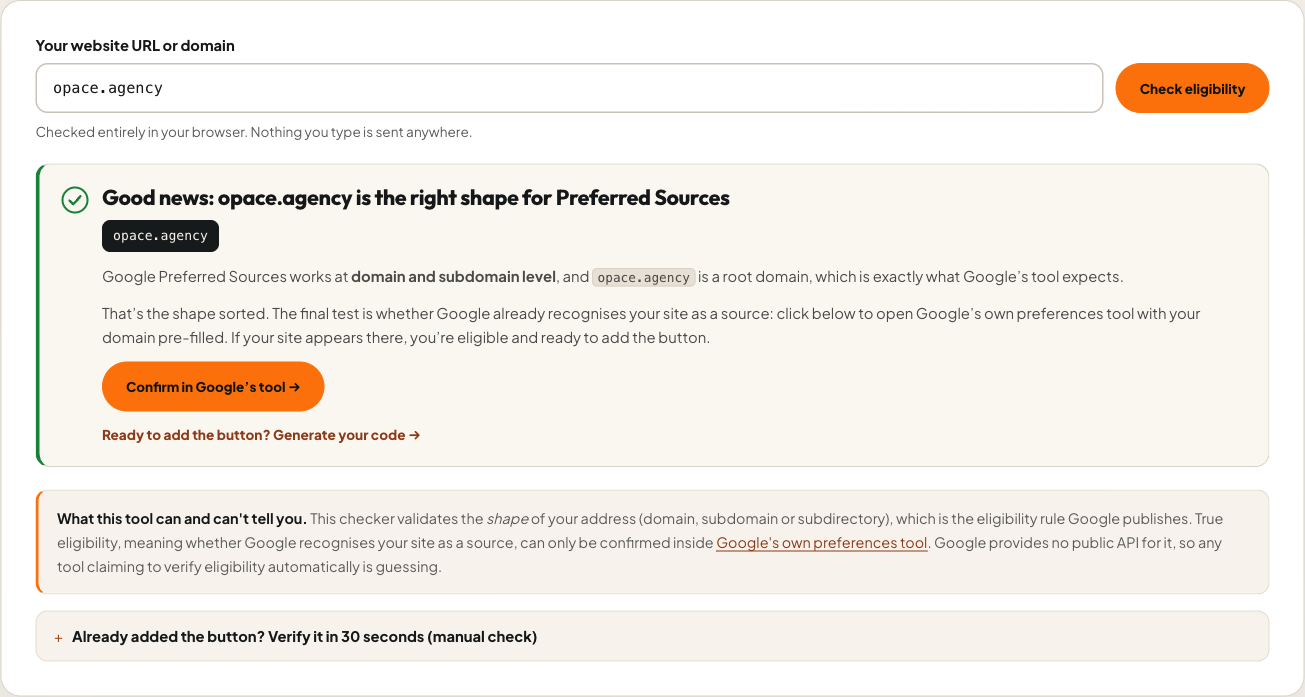
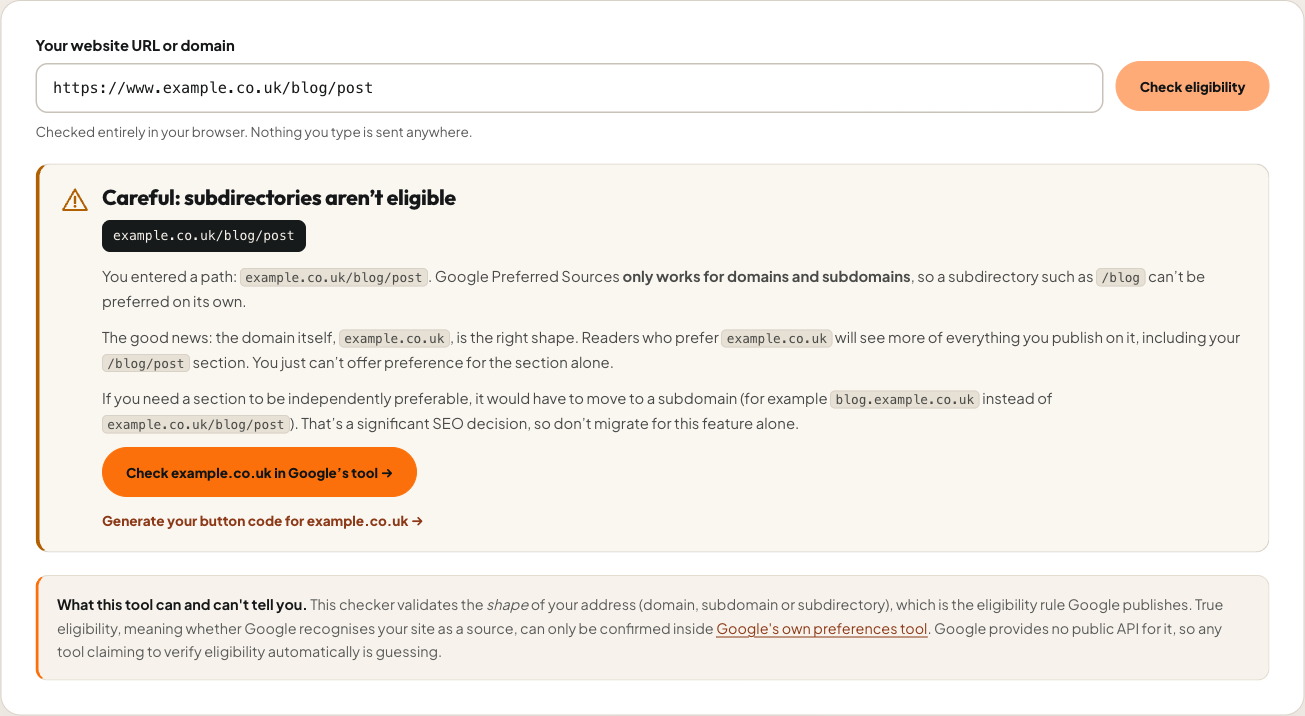
/blog/post must be checked at host level.How the checker works
Three steps, all in your browser, ending in the only place true eligibility can be confirmed: Google's own preferences tool.
We normalise www, paths, ports and international characters before anything is judged.

A Preferred Sources eligible domain is a root domain or subdomain. Subdirectories get a clear warning, because Google applies preferences at host level only.

One click opens Google's preferences page pre-filled with your domain for the final word.
The shape rules come straight from Google's official Preferred Sources documentation.
Why it matters
When a reader marks your site as a preferred source, Google shows them more of you: more often in Top Stories with a "Preferred" badge, more prominently in their Discover feed, and, since June 2026, with priority in AI Overviews and AI Mode citations. Google reports that readers who prefer a source click through to it roughly twice as often, and over 600,000 unique sources had been selected by August 2026.
It's a per-user personalisation signal, not a ranking boost, which is exactly why the opportunity is under-used: the sites that ask readers to opt in are the ones that benefit. Checking eligibility takes ten seconds with this free Preferred Sources checker and the pay-off compounds with every loyal reader. Once you're eligible, our button generator gives you the code, and setting it up well for publishers is part of the SEO services we provide from Birmingham for clients across the UK and internationally.
What the check confirms
This page checks whether the address is a domain or subdomain. Google's preferences page provides the final confirmation.
Eligible? Next step
Make it effortless for readers to opt in. The generator produces the official Add as Preferred Source for Google popup button, a custom-styled one or a deeplink, with exact snippets for seven platforms.
Paste inside your page's <head>
<script async src="https://news.google.com/swg/js/v1/publisher.js"></script>

Paste where the button should appear
<div google-add-preferred-source-btn></div>

✔ Google renders the button and popup
The Preferred Sources suite
Everything you need to check eligibility, add the button and measure clicks, alongside the wider Opace tool catalogue.
Questions before you rely on it
Preferred Sources is a Google Search feature that lets any signed-in user mark a publication as one they want to see more of. Preferred sites appear more often in Top Stories with a "Preferred" badge, influence the user's Google Discover feed, and are prioritised in AI Overviews and AI Mode citations. It's a per-user setting: it boosts your visibility with readers who choose you, not your rankings in general.
Domains and subdomains. example.com and news.example.com are each a Preferred Sources eligible domain in their own right; a subdirectory like example.com/blog is not. There's no application process. Your site simply needs to be recognised as a source in Google's preferences tool, which this checker links you straight into.
Google applies preferences at host level only. Readers who prefer your domain will still see more of your blog's content; you simply can't offer preference for the subdirectory alone. If a section genuinely needs independent preference it would have to live on a subdomain, but that's a major SEO migration and rarely worth doing for this feature by itself.
No, and no third-party tool can. Google provides no public eligibility API. This Google Preferred Sources eligibility checker validates the published shape rules (domain vs subdomain vs subdirectory) instantly, then hands you into Google's own preferences tool, pre-filled with your domain, which is the only place true eligibility is confirmed.
No. The whole check runs in your browser using the standard URL parser. Nothing you type is transmitted, stored or logged by Opace.
No. Users can prefer your site directly from Search results or from Google's preferences page without you implementing anything. The button simply makes it far more likely readers will actually do it. Google reports users who prefer a source click through to it roughly twice as often.
Not globally. It's personalisation: readers who prefer you see more of you across Top Stories, Discover and AI Overviews. Fresh, relevant content is still required; the preference doesn't override relevance for a query.
Use our free button generator. It produces Add as Preferred Source for Google code for plain HTML, WordPress, Elementor, Webflow, Shopify, Astro and React, using Google's official SDK. On WordPress, our plugin does it without any code.
Created by Opace Digital Agency
Opace builds practical SEO and publishing systems from Birmingham for organisations across the UK and internationally, and this free suite comes from that client work.
Ten seconds to a straight answer
This tool is independently developed by Opace Digital Agency and is not affiliated with, endorsed by or sponsored by Google. Google and the Google logo are trademarks of Google LLC.